Loading...
Searching...
No Matches
TimeBasedInterpolator Class Reference
Enables scheduling a sequence of pre-planned motions towards given coordinate points, the system will create linearly interpolating motion between the input points. More...
#include <interpolators.hpp>
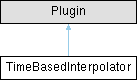
Inheritance diagram for TimeBasedInterpolator:
Public Member Functions | |
| int16_t | add_move (uint8_t mode, float32_t velocity_per_s, DecimalPosition x, DecimalPosition y, DecimalPosition z, DecimalPosition e, DecimalPosition r, DecimalPosition t) |
| Add a move to the list of moves the interpolator will perform (indicate target velocity). | |
| int16_t | add_timed_move (uint8_t mode, float32_t time_s, DecimalPosition x, DecimalPosition y, DecimalPosition z, DecimalPosition e, DecimalPosition r, DecimalPosition t) |
| Add a move to the list of moves the interpolator will perform (indicate motion time). | |
| void | begin () |
| Initialize the time-based interpolator. This must be called to set up the interpolator. | |
| bool | is_idle () |
| bool | queue_is_full () |
Public Attributes | |
| volatile ControlParameter | speed_overide = 1 |
| ControlParameter specifying a multiplicative modifier for the interpolator speed. | |
| BlockPort | output_x |
| Output BlockPort for the generated position signal on axis X. | |
| BlockPort | output_y |
| Output BlockPort for the generated position signal on axis Y. | |
| BlockPort | output_z |
| Output BlockPort for the generated position signal on axis Z. | |
| BlockPort | output_e |
| Output BlockPort for the generated position signal on axis E. | |
| BlockPort | output_r |
| Output BlockPort for the generated position signal on axis R. | |
| BlockPort | output_t |
| Output BlockPort for the generated position signal on axis T. | |
| BlockPort | output_parameter |
| Output BlockPort for the generated position signal of a parameter in [0, 1] range. The parameter varies from 0 to 1 along each linear segment corresponding to a single move. | |
| BlockPort | output_duration |
| Output BlockPort for the duration of the active move. Indicates the time the entire move is scheduled to take. This is useful to plan parallel motion that we want to happen during moves. | |
Protected Member Functions | |
| void | run () |
Detailed Description
Enables scheduling a sequence of pre-planned motions towards given coordinate points, the system will create linearly interpolating motion between the input points.
For an example of how to use this class, see:
#define module_driver
#include "stepdance.hpp"
// -- Define Input Ports --
InputPort input_a;
// -- Define Output Ports --
OutputPort output_a; // Axidraw left motor
OutputPort output_b; // Axidraw right motor
OutputPort output_c; // Z axis, a servo driver for the AxiDraw
// -- Define Motion Channels --
Channel channel_a; //AxiDraw "A" axis --> left motor motion
Channel channel_b; // AxiDraw "B" axis --> right motor motion
// -- Define Kinematics --
// Kinematics convert between two coordinate spaces.
// We think in XY, but the axidraw moves in AB according to "CoreXY" (also "HBot") kinematics
KinematicsCoreXY axidraw_kinematics;
Homing homing;
RPC rpc;
void setup() {
// -- Configure and start the output ports --
output_a.begin(OUTPUT_A); // "OUTPUT_A" specifies the physical port on the PCB for the output.
output_b.begin(OUTPUT_B);
// Enable the output drivers
enable_drivers();
// -- Configure and start the channels --
channel_a.begin(&output_a, SIGNAL_E); // Connects the channel to the "E" signal on "output_a".
// We choose the "E" signal because it results in a step pulse of 7us,
// which is more than long enough for the driver IC
channel_a.invert_output(); // CALL THIS TO INVERT THE MOTOR DIRECTION IF NEEDED
channel_b.begin(&output_b, SIGNAL_E);
channel_b.invert_output();
// Axidraw
channel_a.set_ratio(25.4, 2874);
channel_b.set_ratio(25.4, 2874);
// -- Configure and start the input port --
input_a.begin(INPUT_A);
// -- Configure and start the kinematics module --
axidraw_kinematics.begin();
tbi.begin();
rpc.begin();
// {"name": "go_to_xy", "args": [6, 5, 10]}
// args are: absolute X, absolute Y, speed (mm/s)
rpc.enroll("go_to_xy", go_to_xy);
// {"name": "corner_test"}
rpc.enroll("corner_test", corner_test);
// {"name": "draw_letter_h_at", "args": [10, 10]}
// args are: start X, start Y
rpc.enroll("draw_letter_h_at", draw_letter_h_at);
// -- Start the stepdance library --
// This activates the system.
dance_start();
}
void loop() {
dance_loop();
}
void go_to_xy(float x, float y, float v) {
tbi.add_move(GLOBAL, v, x, y, 0, 0, 0, 0); // mode, vel, x, y, 0, 0, 0, 0
}
void corner_test() {
tbi.add_move(GLOBAL, 10, 0, 0, 0, 0, 0, 0); // mode, vel, x, y, 0, 0, 0, 0
tbi.add_move(GLOBAL, 10, 50, 0, 0, 0, 0, 0); // mode, vel, x, y, 0, 0, 0, 0
tbi.add_move(GLOBAL, 10, 50, 30, 0, 0, 0, 0); // mode, vel, x, y, 0, 0, 0, 0
}
void draw_letter_h_at(float x_start, float y_start) {
// Coordinates will draw a capital letter H
tbi.add_move(GLOBAL, 10, x_start, y_start, 0, 0, 0, 0); // mode, vel, x, y, 0, 0, 0, 0
tbi.add_move(GLOBAL, 10, x_start + 10, y_start, 0, 0, 0, 0);
tbi.add_move(GLOBAL, 10, x_start + 10, y_start + 20, 0, 0, 0, 0);
tbi.add_move(GLOBAL, 10, x_start + 30, y_start + 20, 0, 0, 0, 0);
tbi.add_move(GLOBAL, 10, x_start + 30, y_start, 0, 0, 0, 0);
tbi.add_move(GLOBAL, 10, x_start + 40, y_start, 0, 0, 0, 0);
tbi.add_move(GLOBAL, 10, x_start + 40, y_start + 50, 0, 0, 0, 0);
tbi.add_move(GLOBAL, 10, x_start + 30, y_start + 50, 0, 0, 0, 0);
tbi.add_move(GLOBAL, 10, x_start + 30, y_start + 30, 0, 0, 0, 0);
tbi.add_move(GLOBAL, 10, x_start + 10, y_start + 30, 0, 0, 0, 0);
tbi.add_move(GLOBAL, 10, x_start + 10, y_start + 50, 0, 0, 0, 0);
tbi.add_move(GLOBAL, 10, x_start, y_start + 50, 0, 0, 0, 0);
tbi.add_move(GLOBAL, 10, x_start, y_start, 0, 0, 0, 0);
}
Member Function Documentation
◆ add_move()
| int16_t TimeBasedInterpolator::add_move | ( | uint8_t | mode, |
| float32_t | velocity_per_s, | ||
| DecimalPosition | x, | ||
| DecimalPosition | y, | ||
| DecimalPosition | z, | ||
| DecimalPosition | e, | ||
| DecimalPosition | r, | ||
| DecimalPosition | t ) |
Add a move to the list of moves the interpolator will perform (indicate target velocity).
- Parameters
-
mode The mode of operation: INCREMENTAL, ABSOLUTE or GLOBAL. velocity_per_s The velocity of motion x Target x position for the move y Target y position for the move z Target z position for the move e Target e position for the move r Target r position for the move t Target t position for the move
◆ add_timed_move()
| int16_t TimeBasedInterpolator::add_timed_move | ( | uint8_t | mode, |
| float32_t | time_s, | ||
| DecimalPosition | x, | ||
| DecimalPosition | y, | ||
| DecimalPosition | z, | ||
| DecimalPosition | e, | ||
| DecimalPosition | r, | ||
| DecimalPosition | t ) |
Add a move to the list of moves the interpolator will perform (indicate motion time).
- Parameters
-
mode The mode of operation: INCREMENTAL, ABSOLUTE or GLOBAL. time_s The duration of the move x Target x position for the move y Target y position for the move z Target z position for the move e Target e position for the move r Target r position for the move t Target t position for the move
Member Data Documentation
◆ output_x
| BlockPort TimeBasedInterpolator::output_x |
Output BlockPort for the generated position signal on axis X.
tbi.output_x.map(&kinematics.input_x); // Control the X axis of a machine
◆ output_y
| BlockPort TimeBasedInterpolator::output_y |
Output BlockPort for the generated position signal on axis Y.
tbi.output_y.map(&kinematics.input_y); // Control the Y axis of a machine
The documentation for this class was generated from the following file: